As an Amazon Associate, we earn from qualifying purchases.
Steelcase Series 1
The cheapest chair from a serious commercial-grade manufacturer with a genuinely adjustable lumbar that slides up and down — not just in and out. Add 4D armrests, an adjustable seat depth, and Steelcase's 12-year warranty, and it's the first chair under $600 we'd put a tall person and a 5'2" person in without worrying about the bump landing in the wrong place.
Check Price on Amazon →At a Glance
- BEST OVERALL: Steelcase Series 1
- BEST BUDGET WITH REAL ADJUSTABILITY: Sihoo Doro C300
- BEST HERMAN MILLER TIER: Herman Miller Sayl (Certified Refurbished, Grey)
- ADJUSTABILITY OPTION: Branch Ergonomic Chair Pro
- BEST ALTERNATIVE PHILOSOPHY: Sleekform Kneeling Chair
| Product | Price as of Oct 3, 2026, 8:06 PM UTC | Rating |
|---|---|---|
| Steelcase Series 1 | $499.00 | 4.5★ |
| Sihoo Doro C300 | $449.99 | 4.4★ |
| Herman Miller Sayl (Certified Refurbished, Grey) | Check price | — |
| Branch Ergonomic Chair Pro | $499.00 | — |
| Sleekform Kneeling Chair | $223.99 | 4.4★ |
If your $400 “ergonomic” chair gave you worse back pain than the dining-room stool you swapped it for, the chair isn’t necessarily broken — it’s almost certainly the wrong size for your body. The dirty secret of the office-chair industry is that most chairs sold as “ergonomic” are built around a fixed lumbar bump positioned for a roughly 5’10” male user. If you’re shorter, that bump lands on your mid-thoracic spine and quietly shoves you forward into the exact slouch you bought the chair to fix. If you’re taller, the bump sits on your sacrum and supports nothing at all.
A genuine ergonomic chair for back pain isn’t defined by a marketing label, a mesh back, or a $1,200 price tag. It’s defined by four specific adjustments: lumbar height, seat depth, 4D armrests, and a tilting seat pan. Most chairs under $500 have one or two of these — almost none have all four. This guide names five that get close enough to matter, plus one kneeling-chair option for people whose backs respond better to a completely different sitting philosophy. The contrarian truth comes first because it changes what you should be shopping for.
As an Amazon Associate, DeskFitPro earns from qualifying purchases. We only recommend products we’d buy ourselves; affiliate links never change which chairs make this list or the order they appear in.
Read this first. Chronic back pain has many causes and not all of them are postural. See a doctor if you have numbness or weakness running down a leg, loss of bladder or bowel control, unexplained fever, sudden severe pain after a fall, or a personal history of cancer with new back pain. This guide is educational, not medical advice. If you have a diagnosed disc herniation, spinal stenosis, recent spinal surgery, or any condition that worsens with lumbar extension, talk to your physician or physical therapist before buying an aggressive-lumbar chair — the right chair for your anatomy may not be the one this guide ranks #1.
Why Most “Ergonomic” Chairs Hurt Your Back More Than a Cheap Stool
Walk into any office-furniture showroom and every chair on the floor will be described as “ergonomic.” It’s a marketing word, not a regulated one. There is no FDA, ISO, or BIFMA certification that says “this chair is ergonomic for your body.” What there is, instead, is a long industry tradition of designing one chair shape for one statistical user — the so-called 50th-percentile male, roughly 5’9” to 5’10”, around 175 pounds, sitting with a 17-inch hip-to-knee length. Every dimension of a stock office chair is built around this person. If you are not this person, the chair is, at best, a compromise.
The specific feature that fails most often is the lumbar support. Look at the back of a typical sub-$400 office chair and you’ll see a fixed bump or curve molded into the backrest at a single, factory-set height. This bump is positioned to land on the lumbar spine — the L3 to L5 vertebrae — of that 5’10” reference user. The problem is geometric: if your torso is shorter than the reference, the bump sits higher on your back, often landing between the shoulder blades on the thoracic spine. It doesn’t support the lumbar curve; it pushes you forward into a hunch. If your torso is longer than the reference, the bump sits lower, on the sacrum or buttocks, supporting nothing and leaving the actual lumbar curve unsupported and free to collapse.
This is why your friend swears their Autonomous chair fixed their lower-back pain in two weeks and yours has only made it worse. The chair didn’t change. The bodies in it did.
A real ergonomic chair — one capable of fitting a range of bodies rather than one statistical user — has to be adjustable in four places, not the standard one or two:
- Lumbar height (vertical position of the bump). Not just “in and out” depth, but up and down. You need to be able to slide the support to the actual height of your L4 to L5 vertebrae, which sits roughly six to eight inches above the seat pan for most adults but varies by torso length. Most chairs under $500 do not offer this. Almost all chairs over $800 do.
- Seat depth (front-to-back position of the seat pan). A seat that’s too deep forces you to either sit forward (off the lumbar support entirely) or push your hips back so hard your tailbone hits the seat back. A seat that’s too shallow cuts off circulation behind the knees. An adjustable seat pan slides forward and back independently of the backrest so the lumbar bump can land where it’s supposed to with your hips fully seated.
- 4D armrests (height, width, depth, and pivot). Armrests aren’t a luxury; they’re load-bearing infrastructure. When your forearms are unsupported, your trapezius and rhomboid muscles work overtime to hold your shoulders, and that tension migrates down into the upper lumbar over a workday. 4D armrests adjust up/down, in/out, forward/back, and rotate inward — letting them actually meet your forearms whether you’re typing, mousing, or reading.
- Seat-pan tilt (forward tilt option). The neutral spinal posture isn’t a 90° hip flexion — it’s closer to 110° to 120°, with the hips slightly above the knees. A seat pan that tilts forward five to ten degrees opens the hip angle, lets the pelvis rotate to neutral, and prevents the lumbar curve from collapsing into a C-shape. Almost no consumer chairs offer this; most commercial-grade chairs do.
This is the part of the chair industry nobody discusses honestly: by these four criteria, the $200 Amazon “ergonomic chair” you saw advertised on Instagram is not an ergonomic chair. It is a regular chair with a mesh back and a fixed lumbar bump that fits one user well, two users acceptably, and seven users not at all. There is a reason the Herman Miller Aeron — frequently held up as the gold-standard ergonomic chair — costs $1,700 and ships in three sizes (A, B, and C). The size options aren’t a luxury. They’re the mechanism by which the chair actually fits a population instead of one person.
The five chairs below are the ones that come closest to that four-adjustment standard at a real-world budget, plus one option for people whose backs respond better to active sitting than to passive support. Read the contrarian warnings near the bottom too — for a small minority of people, an aggressive lumbar support is exactly the wrong fix.
The 4 Adjustability Specs That Matter for Back Pain
If you remember nothing else from this guide, remember the spec sheet. Before clicking “buy” on any chair, find the product page and look for these four phrases — in this exact order of importance. If a chair doesn’t list at least three of them, it is not an ergonomic chair, regardless of what the marketing copy says.
A chair that has only “adjustable lumbar” (depth only) and 3D armrests is a chair sized for the average male user with two modest concessions to variation. It will fit some people and disappoint others. A chair with all four adjustments will fit nearly anyone with patience and a tape measure. The price difference between those two categories is the actual ergonomic premium — not the brand name, not the mesh, not the headrest.
Detailed Reviews
1. Steelcase Series 1

Why it's here: Compare the Steelcase Series 1 if its available adjustments and size suit your workspace. Confirm the exact armrest configuration, seat fit, and return terms. We have not established a pain-relief advantage over the Leap or Gesture.
- One of the cheapest chairs at this adjustment tier — most chairs with this spec sheet cost $900+
- Steelcase's commercial-grade construction — built for ten-hour days, not weekends
- Fits users from roughly 5'0" to 6'4" thanks to true vertical lumbar adjustment
- 12-year warranty backed by a 100-year-old company
- No forward seat tilt — the one major adjustment missing at this price
- Headrest is not standard; add-on costs extra
- Setup is involved — give yourself 45 minutes
2. Sihoo Doro C300

Why it's here: If $500+ isn't in the budget, the Doro C300 is the chair that comes closest without compromising on the adjustments that matter for back pain. The dynamic lumbar is genuinely clever — instead of a fixed bump, the lumbar section of the backrest pivots forward and back with your spine, so the support follows you when you shift. It's not a substitute for manually setting lumbar height for an unusual torso, but for the broad middle of users, it works. The 4D armrests at sub-$400 are the real giveaway that Sihoo is trying — most chairs in this price band ship with 2D or 3D arms.
- Cheapest chair with both 4D arms and a meaningful lumbar mechanism
- Dynamic lumbar works differently than a fixed bump — pivots with movement
- Comfortable for users in the 5'4" to 6'1" range out of the box
- Free trial and return options through major retailers
- Lumbar height is not manually adjustable — the dynamic mechanism does the work, which won't be enough for very short or very tall users
- Plastic components feel less premium than Steelcase
- 5-year warranty — half the duration of the Series 1
3. Herman Miller Sayl (Certified Refurbished, Grey)
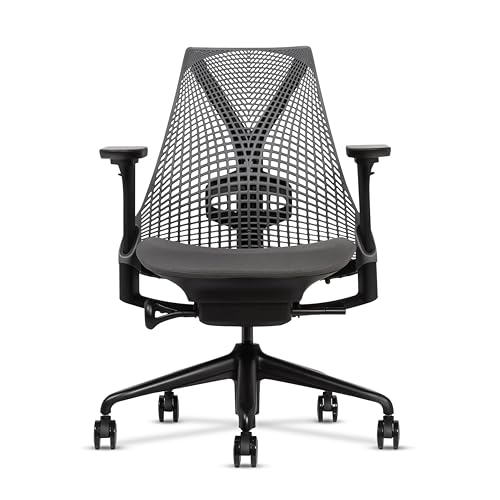
Why it's here: The Sayl is the entry point into Herman Miller's actual ergonomic line, and this listing is how you get one on Amazon now — new Sayls are no longer sold there, so our pick is a certified-refurbished unit at $524. Crucially, it comes in the configuration that matters: adjustable lumbar, PostureFit sacral support, and fully adjustable arms, with Herman Miller's Harmonic Tilt recline and a 12-year warranty from the refurbisher. The Y-Tower backrest is a different design philosophy from every other chair on the list — instead of a localized lumbar bump, the entire back is a tensioned suspension surface that flexes with the spine. For some users this is a revelation; for others, the absence of a defined lumbar contact point feels under-supportive. Compare it to the Steelcase Series 1 if you're cross-shopping; the Series 1 buys you new, the Sayl buys you the Herman Miller tier at a refurb discount.
- Certified-refurbished pricing puts a properly configured Herman Miller under $550 — adjustable lumbar and fully adjustable arms included
- The Y-Tower back works for users who hate the feeling of a localized bump
- 12-year warranty from the refurbisher — unusually long coverage for a refurbished chair
- Made in the US, BIFMA Level 3 sustainability rating
- Refurbished, not new — expect some cosmetic wear, and the 12-year warranty is the refurbisher's promise, not Herman Miller's
- The unframed back is polarizing — some users find it doesn't feel "supportive enough" even with the lumbar adjustment
- Forward seat tilt isn't listed on this refurb's spec sheet — confirm the config before buying if the seat-angle option is why you want a Sayl
4. Branch Ergonomic Chair Pro
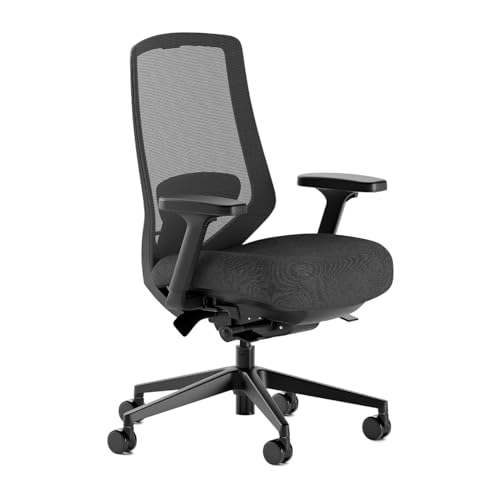
Why it's here: The Pro replaces our unresolved original Branch chair link. The checked offer is sold by Branch Office Furniture. Its advertised 14 adjustments include adjustable lumbar support, 5D armrests and forward seat tilt. Choose it for fit controls, not a promise to treat back pain.
- Multiple lumbar, arm and tilt adjustments
- Brand-sold offer confirmed in our check
- Different model from the original Ergonomic Chair
- Confirm Amazon seller returns; direct-store policies may differ
5. Sleekform Kneeling Chair

Why it's here: Kneeling chairs solve a different problem. Where every other chair on this list tries to support a flawed sitting posture, the kneeling chair changes the posture itself. By tilting the seat forward and putting the shins on a pad, the hip angle opens past 90° to roughly 110° — which lets the pelvis rotate to a neutral position and the lumbar curve return to its natural shape without any external support. For about one in four readers, this is the right answer and every "ergonomic" chair they've tried has been the wrong one. It is not a full-day chair — most people use it for 30 to 60 minutes at a stretch and then alternate with a standing position or a conventional chair. Treat it as the third leg of a rotation, not a replacement for everything.
- Sidesteps the "wrong lumbar bump" problem entirely — there is no bump
- Forces an open hip angle that lets the lumbar curve return to neutral
- Excellent option for people who've tried multiple chairs and still hurt
- Pairs perfectly with a sit-stand desk for active position changes
- Not a full-time chair for most people — best used 30 to 60 minutes at a time, alternated with standing or a regular chair
- Shin pressure takes a week of adaptation
- No armrests at all — not suitable for heavy mousing or extended typing
- Aesthetically polarizing in shared offices
Lumbar Bump Positioning: How to Set It Right
Buying the right chair is only half the work. The other half is setting the adjustable lumbar to actually contact your lumbar — which is not necessarily the height the chair shipped at, and not necessarily the height that “feels right” on day one. Most users set the lumbar bump too high, because too-high feels like more support, and then wonder why their mid-back hurts after a week.
Here is the correct method:
- Find your L4–L5 anatomically. Stand up. Run your thumbs down your spine until you find the bony bumps that sit just above your pelvis — the iliac crests at the very top of the hip bone. Draw an imaginary horizontal line between the top of your two iliac crests. That line crosses the spine at roughly L4. The vertebra immediately above is L3; immediately below is L5. The lumbar bump should land somewhere in this range.
- Measure from seat to L4. Sit upright in the chair with your hips all the way back against the seat. Have a partner (or use a mirror and a ruler) measure the vertical distance from the seat pan to the iliac-crest line on your back. For most adults, this distance is six to eight inches, but it varies by torso length and ranges roughly four to ten inches across the population.
- Set the lumbar to that height. Slide the chair’s adjustable lumbar bump so that its highest point lands at the measured distance above the seat. Don’t trust feel — trust the measurement. Most people’s intuition about “where my lower back is” is two to three inches higher than reality.
- Set seat depth so your knees clear the front edge by two to three fingers. Hips fully back, the front edge of the seat should leave a two- to three-finger gap behind your knees. Too deep and you’ll either slide forward (off the lumbar) or compress the back of your knees. Too shallow and you lose thigh support.
- Set armrests so your shoulders are neutral. Forearms parallel to the floor, elbows at roughly 90°, shoulders relaxed and down — not shrugged. If your shoulders are riding up, the armrests are too high.
- Test for one week, then adjust ±1 inch. Most people need a small adjustment after their body adapts to the new geometry. If the lumbar feels too intense, slide it down half an inch. If it feels like it’s not contacting at all, slide it up.
Skip this calibration and a $1,200 chair will perform like a $200 chair. The chair is the platform; the setup is the actual ergonomic intervention.
Sit-Stand vs Static: When Even the Best Chair Isn’t Enough
A chair is the wrong primary intervention for one large category of back pain: pain caused not by bad sitting but by too much sitting of any kind. If your back hurts after six hours in any chair — even a properly fitted one — the chair isn’t the problem. The duration is.
The research here is consistent and depressing. Lumbar disc pressure is substantially higher when sitting than when standing, and the longer you sit, the more the discs creep into a flattened, pressurized shape that takes hours to recover from. No amount of lumbar adjustability fixes this. The fix is to alternate positions: 30 to 60 minutes seated, then 15 to 30 minutes standing, then back to seated, all day. This rotation gives the discs time to depressurize and the spinal muscles time to reset between loaded postures.
The practical implication: if you have chronic back pain and you don’t already own a sit-stand desk, the standing desk is probably a higher-leverage purchase than the chair. We rank our picks in our standing desk guide — the budget option there ($300 to $400) plus a $400 to $500 chair from this guide is a better total system than $1,200 spent on the chair alone with a static desk underneath it.
If a chair alone isn’t fixing your pain after three to four weeks of correct setup, the next move is movement frequency — not a more expensive chair.
Who Should NOT Use Aggressive Lumbar Support
For most people with chronic, sitting-related lower-back pain, an adjustable lumbar support is the right intervention. For a meaningful minority, it is exactly the wrong one. Aggressive lumbar support pushes the lower spine into extension — bending the lumbar backward, away from the slump position. Several conditions get worse, not better, with that movement:
- Spinal stenosis. Stenosis is a narrowing of the spinal canal, often from bone spurs or thickened ligaments. Extension narrows the canal further. People with stenosis usually feel better in flexion (slight forward curl) and worse in extension. An aggressive lumbar bump can quietly worsen symptoms over weeks. If you have a diagnosis of stenosis, talk to your physical therapist about whether to use the lumbar support at all, or whether to set it to its minimum depth.
- Acute disc herniation, certain types. Some posterior herniations respond well to extension (the McKenzie protocol). Others — particularly anterior or far-lateral herniations — get worse with extension. If you have a recent diagnosis, do not self-prescribe extension before a PT evaluation.
- Recent spinal surgery. Fusions, laminectomies, and discectomies typically come with movement restrictions for the first 6 to 12 months, often including extension limits. Confirm with your surgeon what range is safe before sitting in any chair with a meaningful lumbar bump.
- Spondylolisthesis. A vertebra slipping forward over the one below it. Extension can worsen the slip. Flexion-biased positioning and core stabilization are usually the first-line conservative treatments.
- Severe osteoporosis. Wedge fractures of the lumbar vertebrae from aggressive extension are a real risk in people with compromised bone density. The chair is unlikely to cause this on its own, but combined with other extension-biased interventions it can.
If any of these describe you, the right starting point isn’t a chair — it’s a physical therapist who knows your imaging. Aggressive ergonomic intervention without a diagnosis is one of the few ways a $1,200 chair can leave you measurably worse off than a folding stool.
How We Picked These
- Four-adjustment standard. We prioritized chairs that offer at least three of the four critical adjustments — vertical lumbar, seat depth, 4D armrests, forward seat tilt. Chairs with only one or two adjustments were excluded, regardless of price or brand recognition.
- Real-world price brackets. The list spans roughly $280 to $530 so that there is a meaningful pick at the budget, mid-range, and premium tiers. We did not include the Aeron Remastered or Steelcase Gesture because for most readers they aren’t a realistic purchase, and the differential value over the Series 1 and Sayl is small relative to the price jump.
- Warranty and build quality. Minimum five-year warranty from a manufacturer with a documented service track record. We excluded several otherwise-strong chairs from newer brands with no service infrastructure behind a two- or three-year warranty.
- User-base diversity. Each pick was vetted against reviews from users in the 5’0” to 6’4” range to confirm the adjustability claims hold up across body sizes. Several otherwise-promising chairs were cut because their “adjustable lumbar” turned out to be depth-only and worked poorly for users outside the average-male band.
- Mechanism diversity. The five picks span adjustable lumbar support (Steelcase, Branch Pro), dynamic lumbar (Sihoo Doro), suspension back (Sayl), and active sitting (kneeling chair). Back pain isn’t monolithic, and the right chair depends on which mechanism your specific pain pattern responds to.
One route this list doesn’t rank but is worth knowing: premium chairs like the Steelcase Leap hold up so well that the used market sells them at roughly a third of new. If your budget is mid-range but your back wants premium adjustability, see the used-market section of our ergonomic chairs guide and the renewed-buying breakdown in the Steelcase Leap review, or browse used Leap V2 listings on eBay (affiliate link).
Honest Limitations of This Guide
This guide is built on a biomechanical framework — the four adjustments — plus build quality and cross-body-size reviews. What it is not is a clinical trial. A few honest caveats:
- No head-to-head trial proves one of these chairs beats another for back pain. The “lumbar height, seat depth, 4D arms, forward tilt” standard is grounded in seating biomechanics and years of user reports, but there’s no RCT comparing, say, the Steelcase Series 1 against the Branch for measured pain reduction. The ranking reflects adjustability, durability, and fit range — not a proven pain-relief hierarchy.
- The “fits 5’0” to 6’4"" claims come from adjustment ranges and reviews, not a fitting lab. We cross-checked each chair against reviews from users across that height band, but if your torso-to-leg proportions are unusual, even a chair with vertical lumbar can miss your L4–L5. The only real test is sitting in it and calibrating with the method above.
- Amazon listings and configurations drift — the Herman Miller Sayl especially. New Sayls are no longer sold on Amazon, so our Sayl pick is a certified-refurbished unit. The listing we link specifies adjustable lumbar, PostureFit sacral support, and fully adjustable arms, but refurbished stock varies unit to unit, and the 12-year warranty comes from the refurbisher rather than Herman Miller. Confirm the spec sheet and condition notes before buying; prices at this tier also move week to week.
Frequently Asked Questions
Is the Herman Miller Aeron really worth $1,700 for back pain?
For some users, yes. The Aeron Remastered ships in three sizes (A, B, C) sized to user height and weight, and at the top of its configuration tree it includes PostureFit SL — a uniquely adjustable lumbar/sacral support that’s better than anything on this list. If you’re under 5’4” or over 6’2”, or above 220 lb, the size options matter enough to justify the price. For users in the middle of the size distribution, the Steelcase Series 1 at $520 delivers most of the same fit at a third of the price. The Aeron is a real upgrade — it’s not a marketing premium — but the marginal return is highest at the tails of the size distribution and smallest in the middle.
Why does my new “ergonomic” chair make my back hurt worse?
Almost always one of three things. First, lumbar height — the bump is in the wrong place for your torso (see the positioning section above). Second, seat depth — your hips aren’t fully back, so the bump is contacting somewhere other than your lumbar. Third, time — your spine is adapting from chronic flexion to active extension, and the first week or two can feel sore even when the setup is correct. Calibrate the geometry first; if pain persists after two weeks of correct setup, the chair may genuinely be the wrong tool for your specific pain.
Mesh back or foam back — which is better for back pain?
Neither is categorically better. Mesh distributes pressure more evenly and runs cooler, which matters for long days. Foam contours more tightly to the spine and can feel more supportive for users who prefer a defined contact point. The adjustability of the lumbar mechanism matters far more than the back material. A foam chair with a properly height-adjustable lumbar beats a mesh chair with a fixed bump every time.
How long until a new chair fixes my back pain?
If the chair is the right fit and set up correctly, most users notice meaningful improvement within two to four weeks. Acute soreness in the first week is normal as the spine adapts to the new geometry. If you’ve used the chair daily for four weeks with correct setup and there’s no improvement, the chair is probably not the limiting factor — see the sit-stand section above, and consider a physical-therapy evaluation.
Do I need a headrest for back pain?
Usually not. Headrests are useful for neck pain, reclined work positions, and phone-call-heavy days. For desk-bound back pain specifically, an unused headrest adds cost without ergonomic benefit. The exception is users with cervical-spine issues that refer pain into the upper back — they often benefit from full head support.
Are gaming chairs the same as ergonomic chairs?
No. Most gaming chairs use a fixed bucket-seat design borrowed from racing cars, with a lumbar pillow strapped to a non-adjustable back. The pillow is a poor substitute for an actual height-adjustable lumbar mechanism, and the seat depth and tilt options are usually limited or absent. A gaming chair is fine if you game; for chronic back pain, the chairs on this list will outperform any gaming chair at the same price point.
What if a chair doesn’t fix my pain at all?
The chair is one of three layers — sitting equipment, sitting duration, and movement frequency. If equipment alone doesn’t fix it, the answer is usually duration and movement. Alternate sitting and standing every 30 to 60 minutes. Add 10 minutes of walking every two hours. Combine the chair with targeted lower-back work — a tool like a lumbar stretcher or inversion device can help decompress what the chair couldn’t prevent. If pain persists despite all three layers, see a physical therapist for a directional-preference evaluation.
Final Thoughts
The chair industry sells the comforting story that ergonomics is a feature you buy. The honest version is that ergonomics is a fit — between a chair’s adjustability and your specific body — and most chairs on the market are not adjustable enough to fit a population of bodies. They are sized for one statistical user and they work for that user well, for everyone else acceptably-to-badly.
Start with the chair whose adjustment range matches your body and desk. Compare Steelcase Series 1 with the Branch Ergonomic Chair Pro for different fit controls; check the current price and seller terms rather than an old budget threshold. The linked Sayl is refurbished, so its condition and refurbisher coverage also matter. No chair on this list is a proven treatment for your particular back pain.
On September 22, 2026, we verified the Pro listing and its offer from Branch Office Furniture. The manufacturer’s Pro specifications describe this model; the original Ergonomic Chair is a different product.
Whatever you choose: measure your L4 to L5, set the lumbar to that height, alternate sitting with standing, and remember that the best chair in the world doesn’t replace movement. It just makes the time you spend not moving less expensive on your spine. See our full ergonomic chair guide for the broader category overview, including chairs we considered but didn’t rank.
Health disclaimer: Educational information only, not medical advice. Chronic back pain can have many causes, some of which require medical evaluation. Consult your physician or a licensed physical therapist before making major changes to your sitting position, especially if you have a known disc herniation, spinal stenosis, spondylolisthesis, recent spinal surgery, severe osteoporosis, or any condition that worsens with lumbar extension. Stop using any chair or device immediately and seek medical care if you develop numbness or weakness in the legs, loss of bladder or bowel control, fever with back pain, or sudden severe pain.
Last updated: June 16, 2026 at 10:30 AM ET. Prices and availability shown are accurate as of this time and are subject to change. As an Amazon Associate, DeskFitPro earns from qualifying purchases.
Ready to Buy?
We may earn a commission if you buy through these links.
Prices checked: Oct 3, 2026, 8:06 PM UTC
Product prices and availability are accurate as of the date/time indicated and are subject to change. Any price and availability information displayed on Amazon.com at the time of purchase will apply to the purchase of this product.
Any prices mentioned in the article text are approximate and for comparison only; the figure shown with each product above is the one checked against Amazon at the time stated.
As an Amazon Associate, DeskFitPro earns from qualifying purchases.