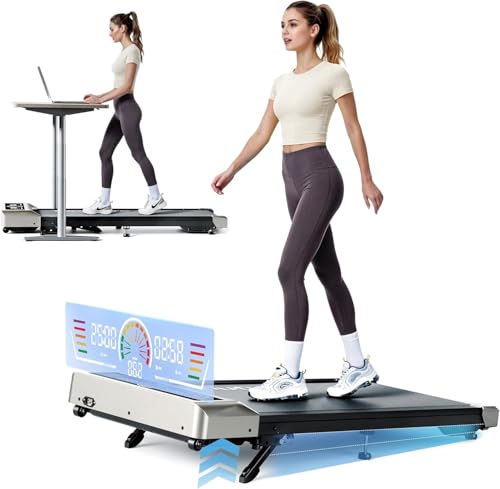
As an Amazon Associate, we earn from qualifying purchases.
FlexiSpot E7 Pro — Best Height Range Overall
Maxes out at 48.4 inches · 3-stage dual motor lift is stable at high heights · 440 lb lifting capacity means the walking pad weight is i...
Check Price on Amazon →At a Glance
- BEST FOR TALL USERS: FlexiSpot E6 MAX Dual-Motor Standing Desk (55" x 28")
- BEST VALUE: VIVO Electric 48x30" — Best Value for Walking Pad Setups
- FlexiSpot EN1 — Best Mid-Range Option
| Desk | Max Height | Walking Pad Compatible? |
|---|---|---|
| FlexiSpot E7 Pro | 48.4" | Best for tall users |
| VIVO Electric 48x30" | 47.6" | Great all-rounder |
| FlexiSpot EN1 | 45.7" | Fine for most users |
| FEZIBO Electric | 45.5" | Borderline for 6'+ users |
| SHW 48-Inch | 45.0" | Limited headroom with thick pads |
| Your Height | Standing Work Surface Needed | Walking Pad Deck Add | Total Desk Height Required | Common Desk Max Height Sufficient? |
|---|---|---|---|---|
| 5'4" | 39" | +5" | 44" | Most desks OK |
| 5'8" | 41" | +5" | 46" | Most desks OK |
| 6'0" | 43" | +5" | 48" | Need 50" max height |
| 6'3" | 45" | +5" | 50" | Need 52" max height (rare) |
| 6'6" | 47" | +5" | 52" | Need custom or extender |
I walk 3-4 miles a day on my walking pad while working. The most common question I get: what standing desk do I actually need? The answer isn’t just “any adjustable desk” — walking pads add 3–5 inches of height, which disqualifies a lot of popular desks for taller users. Here’s exactly how to pick the right one, and which desks work best.
The Height Problem Most People Miss
When you add a walking pad, your effective standing height increases by the thickness of the pad — typically 3 to 5 inches depending on the model. If your normal standing desk height is 43 inches, you now need the desk at 46–48 inches while walking.
Most budget standing desks max out at 45–46 inches. That’s fine if you’re under 5’9” — but if you’re taller, or if your walking pad is on the thicker side, you could run out of height range and end up hunching over your keyboard all day, which defeats the entire point.
How to Calculate Your Required Height
- Find your normal standing desk height — elbow height with shoulders relaxed. For most people this is 40–46 inches.
- Measure your walking pad height — typically 3–5 inches (check the product specs).
- Add them together — that’s the minimum your desk needs to reach.
- Add 1–2 inches of buffer — so you have room to adjust as your pace changes.
Example: If your standing height is 44” and your walking pad is 4” tall, you need a desk that reaches at least 48–49 inches. That rules out most entry-level desks.
What About Budget Desks?
The SHW ($190) and FEZIBO ($150) are good desks, but their height ceilings make them risky choices for walking pad setups unless you’re under 5’8” and using a thin pad. At 45–45.5”, you have 3–4” of buffer for a walking pad before you hit the ceiling — just enough for shorter users.
If budget is the primary concern, the FEZIBO at $150 is the better pick over the SHW for the extra half inch. But if you’re investing in a walking pad, the desk is not where to cut corners — a desk that doesn’t reach the right height makes the whole setup uncomfortable.
Setup Tips: Getting the Ergonomics Right
- Walking pace ergonomics differ from standing ergonomics. When walking, keep your keyboard 1–2 inches lower than your normal standing height to keep shoulders relaxed as your arms move.
- Monitor needs to go up too. If your desk rises 4 inches for walking, your monitor needs to rise 4 inches. A good monitor arm makes this trivial.
- Keyboard position matters more walking than standing. Consider an ergonomic keyboard — typing at a slight negative tilt reduces wrist fatigue during long walking sessions.
- Start at 1.5 MPH. Most people can type comfortably at 1.5–2.5 MPH. Save faster speeds for calls where you’re not typing.
Why Your Existing Standing Desk Probably Doesn’t Go High Enough for a Walking Pad
Here’s the math nobody runs before they buy: a walking pad adds 4–6 inches to your floor. That’s elevation your desk has to add on top of the height it already needs to reach for normal standing work. If your current desk barely clears your elbows when you’re flat on the floor, putting a walking pad under it pushes the ergonomics into a zone most lifting columns weren’t designed for.
The standing-elbow rule says most adults need a desk surface between 38 and 44 inches off the floor for comfortable standing work — roughly elbow height with your forearms parallel to the ground. Add a 4–6 inch walking pad deck under your feet and the required desk surface jumps to 42–50 inches. A lot of mid-range “standing desks” max out at 47 or 48 inches. That’s fine for users under about 6’0” working on a bare floor, but it breaks the moment you slide a walking pad underneath, especially if you’re tall.
Frame stability matters more than the spec sheet’s headline max-height number. Walking shakes the desk, and that shake is amplified when the column is at full extension. Two things stabilize a desk at the top of its travel: crossbar count (a frame with a horizontal crossbar between the legs flexes less than one without) and leg construction (3-stage steel legs hold steadier than 2-stage). Dual-motor frames keep both legs synchronized and stay rigid at extension; single-motor frames, where one motor drives both legs through a transfer rod, develop a noticeable wobble above 45 inches even when the spec sheet claims a higher max.
If you’re shopping for a walking-pad-compatible desk, the order of operations is: calculate your total required height first, then filter for frames that hit that number with at least two inches of buffer left over, then check the stability specs. Most buyers reverse it — they pick a frame they like, then discover at assembly time that the desk tops out two inches below their walking elbow height.
There’s also a less obvious failure mode worth flagging: the desk’s minimum height. If you want the same desk to work for seated days (without unloading the walking pad off the floor), the frame needs a wide travel range. A desk that ranges from 28” to 47” only gives you 19” of usable adjustment, and once a walking pad eats 4–6” of that range, your seated position gets cramped. Look for total travel of 22” or more so the desk stays usable as a full sit-stand setup even with the pad parked underneath.
Standing Desk Height Math for Walking Pad Users
Note: For walking pads with thicker decks (6”+), add 6” to the math instead of 5”. The walking-pad deck thickness is the variable most buyers don’t check before buying a desk — slim treadmill-style pads sit around 4.5”, but cushioned or shock-absorbing models routinely run 5.5–6.5”. A two-inch swing here is the difference between a desk that works and a desk you have to replace.
Three Specs to Verify Before Buying a Standing Desk for a Walking Pad
Once you know the total desk height you need, screen frames against these three specs. Any one of them missing and the desk will technically “fit” but feel wrong the first time you walk on it.
- Max height ≥ your total required height + 2” buffer. The buffer matters because most people type more comfortably with the surface slightly above raw elbow height, and because the headline max-height number on spec sheets often measures to the top of the frame, not the top of your desktop (a thick desktop adds another inch). If your math says you need 48 inches, shop for frames that hit 50.
- Dual motor with at least 2 crossbars (or a 3-stage frame). Single-motor frames develop a noticeable side-to-side wobble at 45 inches and above — exactly where walking-pad users live. Dual-motor frames with a horizontal crossbar between the legs, or 3-stage frames where each leg has three telescoping segments instead of two, stay rigid at full extension. If you can only get one of those features, prioritize 3-stage legs.
- Weight capacity ≥ your monitor setup + 50 lbs. A walking pad puts dynamic load on the desk through your hands. Most people grip the edge to stabilize when they speed up, slow down, or reach for something — that’s intermittent downforce the desk has to absorb without flexing. A 50-lb buffer above your static monitor-and-accessories weight handles those moments without the frame creaking or the column motor straining.
Who Should Skip a New Walking-Pad Standing Desk
Not everyone reading this needs to buy a new desk. Three situations where the smarter move is to spend elsewhere:
- Shorter users who already own a tall-enough desk. If you’re under about 5’8”, running a thin (roughly 4-inch) pad, and your current desk already reaches 46-47 inches, do the height math before you rebuy — you may already clear your walking elbow height with buffer to spare. Measure first; don’t let the “you need a special desk” framing sell you a desk you don’t need.
- Renters and small-space setups where a full electric frame won’t fit. A large sit-stand frame plus a walking pad eats a lot of floor. If space or a lease makes that impractical, a desktop riser converter on your existing desk, paired with a slim pad, often fits the room better than committing to a new full-size frame.
- People who sit most of the day and walk occasionally. The dual-motor, 3-stage stability we prioritize here is a premium aimed at frequent walkers who need a rock-steady surface mid-stride. If you’ll walk a couple of times a week, a solid single-motor mid-range desk saves real money and the stability gap won’t bother you.
Honest Limitations of This Guide
The height math in this guide is genuinely useful, but a few caveats keep it honest:
- Published max-height specs measure the frame, not your desktop. Manufacturers usually quote the top of the frame; a thick desktop can add an inch, and some listings measure differently. The real usable surface height can land an inch or two off the headline number, so verify at assembly rather than trusting the spec sheet alone.
- Wobble at full extension isn’t a standardized, tested figure. There’s no industry stability benchmark, so our read on which frames stay steady at walking height leans on design signals — dual-motor, crossbar, 3-stage legs — plus owner reports, not a controlled measurement. Two desks with the same max height can feel very different at the top of their travel.
- Walking-pad deck thickness is the variable buyers skip. Pads range from roughly 4 inches to 6.5 inches, and that two-inch swing decides whether a desk fits. The height table assumes a mid-range deck; it only works if you plug in your specific pad’s real thickness.
How We Picked These
We confirmed each desk’s ASIN and current price against live Amazon listings, then built the height table from standard elbow-height ergonomic guidance — which is a population average, so the honest instruction is still to measure your own standing elbow height rather than trust the row. We prioritized frames that clear the total required height (standing surface plus pad plus buffer) with headroom left, then filtered for the stability features that matter most at walking height: dual-motor or 3-stage legs and a crossbar.
This guide is grounded in daily real-world use — the author walks 3-4 miles a day on a pad under a standing desk — but we did not assemble and stress-test every desk on the list. Where the call rests on published specs and owner feedback rather than hands-on testing, that’s the basis, and prices in this category change often enough to re-check before buying.
Frequently Asked Questions
How high does my standing desk need to be for a walking pad?
Add your walking pad’s thickness (typically 3–5 inches) to your normal standing desk height. If you normally work at 44 inches standing, you need a desk that reaches 47–49 inches. Most budget desks max at 45–46”, which is why the VIVO (47.6”) and FlexiSpot E7 Pro (48.4”) are the top recommendations for walking pad setups.
Can I use any standing desk with a walking pad?
Technically yes, but you need to verify the maximum height. The walking pad raises your effective floor height by 3–5 inches. If your desk can’t reach high enough, you’ll hunch — which causes the exact back and neck problems you’re trying to prevent.
Does the walking pad weight affect desk stability?
Walking pads weigh 30–50 lbs. The bigger concern is your own weight shifting as you walk — a dual-motor desk like the FlexiSpot E7 Pro is noticeably more stable at walking height than single-motor desks.
What’s the best walking pad to pair with a standing desk?
See our full best walking pads guide — I’ve used the Sperax daily for over a year at 300 lbs and it hasn’t skipped a beat. The 3.7” profile is a manageable height addition for any desk on this list.
Last updated: July 01, 2026 at 01:07 PM ET. Prices and availability shown are accurate as of this time and are subject to change. As an Amazon Associate, DeskFitPro earns from qualifying purchases.
Detailed Reviews
1. FlexiSpot E6 MAX Dual-Motor Standing Desk (55" x 28")
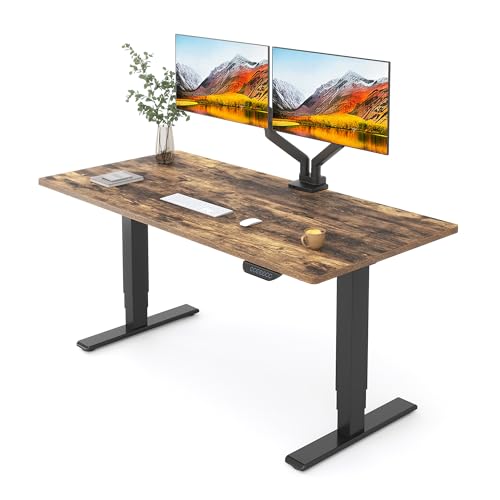
Why it's here: A dual-motor, three-stage frame rated to 330 lb — and the three-stage part is what matters for walking-pad use. Three-stage legs travel further than the two-stage frames used on cheaper desks, which is exactly the height you need back once a walking pad has raised you three or four inches off the floor. A two-stage desk that fits you standing on the floor will often be a couple of inches short standing on a pad.
- Three-stage legs give the extra travel a walking pad takes away
- Dual motors lift more evenly and quietly than a single-motor frame
- 330 lb rated capacity leaves headroom for monitors, arms and a heavy top
- Costs more than the two-stage desks that are adequate for shorter users
- 55 x 28 inches is a large footprint for a small room
- Confirm your own standing height on top of your pad before ordering — we cannot do that for you
2. VIVO Electric 48x30" — Best Value for Walking Pad Setups

- 47.6" height works for most users with standard walking pads
- $280 — less than half the E7 Pro with nearly the same height range
- Large 48x30" work surface, comfortable to type while walking
- 4.5-star rating from 4,200+ buyers
- Taller users (6'3"+) or thick walking pads may run out of headroom
- Single motor vs dual motor on the E7 Pro
3. FlexiSpot EN1 — Best Mid-Range Option

- Most popular FlexiSpot model — 8,500+ reviews of real-world data
- One-piece desktop is sturdier than the VIVO at this price
- 5-year warranty
- 45.7" ceiling is tight if you're over 6' or have a thick walking pad
- Costs $80 more than the VIVO for a lower height ceiling
Ready to Buy?
We may earn a commission if you buy through these links.
Prices checked: Oct 3, 2026, 8:06 PM UTC
Product prices and availability are accurate as of the date/time indicated and are subject to change. Any price and availability information displayed on Amazon.com at the time of purchase will apply to the purchase of this product.
Any prices mentioned in the article text are approximate and for comparison only; the figure shown with each product above is the one checked against Amazon at the time stated.
As an Amazon Associate, DeskFitPro earns from qualifying purchases.